
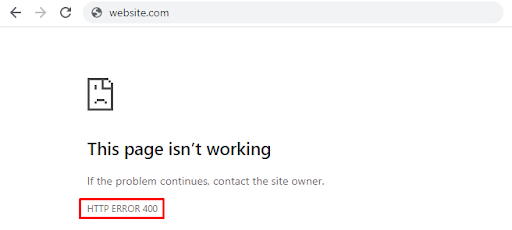
HTTP status codes can be confusing for anyone who hasn’t dealt with them before. However, they are pretty easy to understand. Got a 400 error and don’t know what to do? You need to know 2 things – its causes and how to fix it. Let’s talk about both.
What is a 400 bad request
As with other codes that start with 4, an HTTP error 400 tells us there is an error on the client’s side. Usually, the server sends it when the malfunction doesn’t fit any other cases. Keep in mind that an error 400 directly relates to the client, meaning that the request sent fails before the server processes it.
What causes a 400 error code to trigger?
There are 4 main causes for an error400 to trigger:
- Incorrectly configured HTTP headers in the client-side request. Some applications and websites monitor headers for anything suspicious in them. If the request doesn’t match the server’s expectations, then there is a high chance of an HTTPS error 400 (but this is not always the user’s fault).
- The same failure occurs if a client tries to upload an oversized file to a server. This is because most sites have limits on the data size that can be uploaded. It’s worth noting that this limit can range from a few kilobytes to a few gigabytes.
- A 400 status code is also triggered when the user tries to access a non-existent page. That could be a link with a typo, incorrect domain, or subdomain.
- Outdated or modified cookies. The server may interpret cookie spoofing as an attempt to attack or exploit a security hole. Therefore, such requests are immediately blocked.
How to fix 400 bad request on the client’s side
Since 99% of bad request error code cases signal an issue on the client’s end, we should look into fixing the HTTP 400 error with this perspective in mind. Check all the elements involved in the client-side request delivery.
Check the website address (URL)
Before taking any advanced steps towards fixing an HTTP error 400 bad request, start by checking the URL. Maybe there is a typo, or one of the letters is capitalized. Some parts of the address can be case-sensitive. This advice might sound plain, but don’t ignore it.
You can also look for the requested page through the search engine built into the site. There is a chance that the page might’ve moved somewhere, but the server can’t show the appropriate HTTP code – a kind of 404 Not Found. Provided the site still works, of course.
Reset browser settings
This method works if the server refuses to accept requests due to “broken” cookies or other data. The site uses cookies to store information about the user in their browser. When a person accesses a site, it tries to recognize their cookies and compare this information with what is already on the server.
Sometimes cookies of one or more users come into conflict, causing an HTTP 400 response code. In this case, you need to open the browser settings and then delete all cache, cookies, and other related items.
Depending on the browser, the process of deleting cookies may vary slightly. Here’s how you do it in Google Chrome:
- Open browser settings
- Go to Privacy and Security
- Pick “Cookies and other site data”
- Delete all
Upload the right-size file
If an HTTP status code 400 appears when you upload a file, try a smaller size. Sometimes webmasters are too lazy to configure the site properly, and instead of a clear explanation like “Uploaded files should not be larger than 2 megabytes,” people get a Bad Request. As a result, you’re left guessing as to what the actual size limit is.
Fix problems related to Windows or third-party software
Your browser isn’t the only thing that can impact the client-server relationship. Some third-party software can also cause a bad request HTTP code (not to mention various viruses). Even Windows itself can be the source of the problem. Thus, you should do the following:
- Reinstall NET.Framework. It’s better to delete the previous version before reinstalling.
- Get some solid antivirus software (or better yet, get 2) and run a deep scan. A virus can be the reason why your request failed with status code 400.
- Conversely, try to disable your antivirus. Sometimes, its firewall can block the whole browser or some of its individual pages. It’s better to give the browser more rights to perform its tasks or install an antivirus that is more loyal to your software.
- Change the firewall parameters. You can find them in the Windows Control Panel. From there, you should allowlist your browser so the firewall doesn’t block your connection to the site.
- Clean your Windows from software trash. You can use dedicated apps like CCleaner.
- Update drivers for network devices.
- Update Windows or scan the system for errors in system components.
How to fix HTTP error 400 on the server’s side

If something fails on the server’s side, it rarely results in an HTTP status 400 bad request. Nevertheless, these cases do exist, so it’s not necessarily the user’s fault for doing something wrong.
Check HTTP Header Requirements
When setting up a site, it’s easy to make a mistake or two. The HTTP Header Requirements may be specified incorrectly, so the server expects requests with errors that cannot be recognized for objective reasons. Thus, the webmaster should double-check the headers on the site or application.
Remove the latest updates & plugins
Sometimes, a bad request error appears after updating the CMS or installing new plugins. If that’s the reason, the most apparent solution is to roll back to the CMS’s earlier version and remove all new plugins.
The main thing is to make a data backup copy before doing this or installing any updates.
Check the database state
Some third-party extensions, such as those for WordPress, get full access to your site and have the right to make changes even to the connected database. If a server error 400 has not disappeared after removing new plugins and is displayed for everyone who tries to access the site, it’s worth checking the database state. You should manually check all entries for any suspicious changes that recently installed extensions may have made.
Fix code & script bugs
Still can’t fix 400 bad request? Looks like you have no choice but to check your code and running scripts. You should debug manually rather than rely on the computer’s help. Make a copy of the application or site, then check each piece of code for errors step by step.
As a last resort, you can call hosting technical support for help. Perhaps the problem is on their side. In this case, you don’t have to do anything. Just wait until everything is fixed for you.
Read more about HTTP Status Codes for SEO
Wrap-up
As you can see, a status code 400 bad request mostly relates to issues that arise on the visitor’s side. This means fixing them will be much faster and easier than dealing with server problems. However, in some cases, the issue may lie with the server, which can be trickier to deal with. Reading all the above-mentioned causes and options on how to fix bad request error 400 should provide you with all the tools needed to gain access to your chosen site.